Notebook-ka-Boom!

The laptop battery fire and explosion recall has expanded again, this time with Lenovo recalling 208,000 9-cell lithium-ion batteries that shipped with certain of the 60 and 61 series laptops.  It turns out that my new Thinkpad, a T60p, has one of these explosive devices attached to it.

I submitted a request through their online form for a new battery, but I find it a bit irritating that the confirmation page says that it will take “4 to 6 weeks” to receive a replacement.  In the meantime, for safety, I’m supposed to remove the battery and only use it with the AC adapter.  Hmm… that kind of defeats the purpose of having a notebook computer, doesn’t it?

It occurs to me that there needs to be some kind of handy short catch-phrase for all the recent notebook battery problems. Glocks have _kB!_ (for kaBOOM!), which is immediately recognizable.

How about noteBOOM!, to be referred to as nB!.  Hmm…  that seems to be a little too derivative.  Any ideas?

Kill All Spammers

I hated to cave in and do away with my catch-all address, but I finally had to do it.  I saw a definite pattern where I’d get four or five apparently hand-crafted emails, followed within a few hours by a tidal wave of bounces.  It appears to me that the spammer were probing my domain to make sure the catch-all was still in place so that their bounces wouldn’t be rejected.  Then, upon confirming the catch-all, they’d engage the bots for a major spam run, with me catching all their crap.  If I’d taken the catch-all off of the domain, their initial probes would have been summarily rejected by the SMTP server. 

Because I’ve been using the domain for the past seven years for making up email addresses at will, I had lots of possibly valid addresses that I had to deal with.  I wrote a short Perl script that groveled through all my old Inboxes (back to 2000) to extract all addresses with an aubreyturner.com address in the “To:” and/or “for” headers (in some cases, especially with lists, my address wouldn’t have been in the “To:” field), discarding duplicates.  When I was done there were 1732 unique email addresses.  I spent a couple of mind-numbing hours going through that list deleting garbage entries from spammer Joe Job backscatter.  That left me with 604 addresses that I had to enter into the Dreamhost email control panel.  Fortunately, they have a “bulk edit” feature for each domain.  But it almost caused the panel to cough up a furball when I uploaded the list.

Now I’ve gone back and deleted another 30 or so that looked legit, but which I’d forgotten had been compromised by spammers.

If anyone out there has tried to email me and the message bounced, it’s probably because I missed an address in the alias file.  I’ve verified that the Contact Form target address works, so you can get in touch that way.

Anyone for killing spammers and using their guts to hang them from light poles?  Or am I the only one so annoyed?

Perplexing Cost Structures

My trusty old Craftsman 18V cordless drill/driver finally gave up the ghost over the weekend.  Or, more accurately, the charger and battery packs gave up the ghost.  I bought it about 3 and a half years ago (right after I bought the house).  Lately the batteries hadn’t been keeping a charge very well and I was expecting to have to replace them.  Then, at some point over the past month or so, the charger quit working without me noticing.  So when I picked it up yesterday to use it I discovered that neither battery had enough charge to even spin the motor.

A quick check of the Sears site showed that the charger could be replaced for about $12.00, but I was also going to need batteries.  They had a two-pack for about $70 or a single for $45, and given that I like having two batteries (it’s a royal PITA to have to wait for the thing to charge if you’re in the middle of something) I was looking at over $80 to replace the batteries and the charger.  At that point it seems worth it to just buy a whole new drill set.  Which I think is why they make these accessories so expensive.  Kind of like razor blades or toner cartridges.

Looking through the selection on the site, I came across one that got high review ratings that included two batteries for $113.  What perplexed me was that the same drill could be bought as part of a drill/flashlight combo for $99.99. 

Interestingly, that’s just about what I paid for my current combo kit (except 18.0V instead of 19.2V).  I’ve never used the flashlight, though (except to check that it worked).

As an aside, I took a look at some other models in the Sunday sales circulars and on some websites.  Just when did power tools become so gaudy?  I was reminded of this because of the contrast between the old, el-cheapo corded Black&Decker that I dragged out yesterday and the new, orange abominations that they sell.

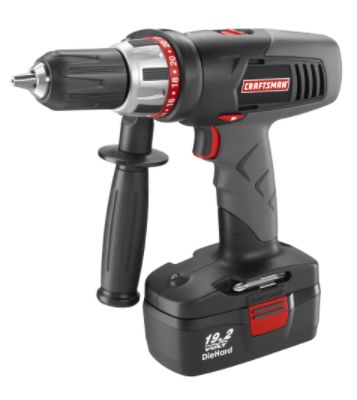
At least this Craftsman is mostly black:

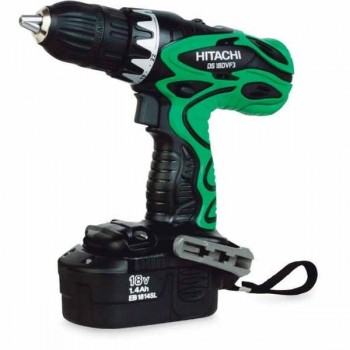
The worst offender, though, has to be this Hitachi that is on sale at Lowe’s:

I find it interesting that the Hitachi costs $50 more than the Craftsman, though.  In terms of specifications, the Craftsman is slightly ahead with 420 in-lbs torque to the Hitachi’s 400.  Otherwise they both come with two batteries, a charger, and a case.  And both are two-speed variable (Hitachi is 0-400/0-1200 and the Craftsman is 0-400/0-1400).  But the Craftsman has a distinct advantage in that it doesn’t have that horrid color scheme.

Free Fire Zone

I heard about this story on the radio this morning.

The Academy of the Sacred Heart in New Orleans is expecting a stream of contributions during Mardi Gras.

The Catholic school has a bank of porta-potties for revelers seeking relief.

A one-time trip costs a buck and an all-day pass is five dollars.

Of course they couldn’t resist a few jokes (i.e. “a stream of contributions”), but this part at the end caught my attention:

While New Orleans maybe long on Mardi Gras fun, it’s short on places for a pit stop.

Author Julie Smith and her husband Lee own a house in the French Quarter. She says the locals know to tape up their mail slots during Mardi Gras, which runs through Tuesday.  (Emphasis added)

Holy cow!  I know people can get desperate, but that’s just way beyond any sort of civilized behavior. 

Instead of taping up my mail slot, I’d probably sit inside with a pellet pistol and give these miscreants something to think about the next day.

Or, if I wanted to be especially cruel, a water gun loaded with habanero juice.  cool grin

Musical Cleanup On Aisle 5!

In my “spare time” I’ve been re-ripping all my CDs to FLAC-encoded files.  I decided that since I was using my server as an archival storage mechanism for my CDs that I ought to go ahead and use a true archival format.  Despite the fact that the sound quality of 320Kbps MP3 files is pretty high, they still don’t faithfully reproduce the original sound.  Worse, portable players like the iPod don’t really take advantage of the quality of a 320Kbps file.  In fact, I’ve found that using high bit-rate MP3s with the iPod causes significant degradation in battery life.  I think this is due to the extra data fetches that are required (i.e. a 320Kbps file will require twice the memory accesses of a 160Kbps file of the same length).  This isn’t as bad on the Nano as it was with the Mini (which makes sense because the Mini used a micro hard drive, which sucks more juice than flash memory), but it’s still noticeable. 

For those not familiar with audio codecs and compression, it should be noted that there are two types: lossy and lossless.  Lossy compression algorithms throw away parts of the sound data so as to reduce the amount of data to be transferred or stored.  The trick with a lossy codec is to find the point where the data that is lost isn’t noticeable to the human ear.  This is something of an art, though, as some people are more sensitive than others.  I find that I can readily identify any MP3 stream under about 160Kbps (i.e. I get a feeling that it’s not quite right).  Lossless codes, such as FLAC or ALE/ALAC, work much like ZIP to compress the data without modifying the data stream itself. 

Some people (mostly anal-retentive audiophiles) just dump their CD’s to WAV files and have done with it.  That certainly guarantees nothing is lost, since the output is pretty much just a copy of what was on the CD.  But it’s pretty wasteful of space, as a single CD may well be 650MB of data.  Something like FLAC can retain all the original data but reduce the size by half, which makes a big difference in the amount of disk space used.  Better yet, FLAC is natively supported by my Squeezebox music players.  I’d always felt kind of strange feeding music via SPDIF to my receivers from the Squeezeboxes when that music was encoded with a lossy codec (even if it was at 320Kbps). 

My strategy now will be to rip everything to FLAC and keep a synchronized directory of 160Kbps MP3s for use with portable audio devices.  This lets me feed the full, original, audio signal to my receivers via the Squeezeboxes and to put them on the iPod without wasting space or battery life.

So while I’ve been re-ripping I’ve also been investigating how the music is tagged.  Over the years I’d relied on CDDB or FreeDB in my ripper program to get the track data.  I’ve found that this data is often just wrong enough to give me headaches.  I store the music under subdirectories by artist, then album name.  Things like different punctuations and spellings for the same artist would really mess up the tags and make finding the music more difficult.

Consider the following example.  In the old collection, there were three entries for Alison Krauss & Union Station:
turnera@minilith:/data/music/flac> find ../artists/ -type d -iname “*alison*”
../artists/alison_krauss__union_station
../artists/alison_krauss_and_union_station
../artists/alison_krauss

I’ve taken pains to make sure that doesn’t happen again in the new collection:
turnera@minilith:/data/music/flac> find Alison_Krauss__Union_Station/ -type d
Alison_Krauss__Union_Station/
Alison_Krauss__Union_Station/Lonely_Runs_Both_Ways
Alison_Krauss__Union_Station/Forget_About_It
Alison_Krauss__Union_Station/New_Favorite
Alison_Krauss__Union_Station/So_Long_So_Wrong
Alison_Krauss__Union_Station/Live_Disc_2
Alison_Krauss__Union_Station/Live_Disc_1

And it’s not just spelling and punctuation.  Sometimes it’s just plain inconsistent naming conventions between the people who entered the data originally:
turnera@minilith:/data/music/flac> find ../artists/ -type d -iname “*kill*”
../artists/soundtrack/kill_bill_volume_1
../artists/various/kill_bill_volume_2_ost
turnera@minilith:/data/music/flac> find . -type d -iname “*kill*”
./Various_Artists/Kill_Bill_Vol_2
./Various_Artists/Kill_Bill_Vol_1

I especially liked the fact that out of five k.d. lang CDs I found that people came up with four different (and wrong) ways of entering her name.  Just for the record, it’s “k.d. lang” (little k period little d period space lang), or at least that’s how she writes it.

And finally, there was the issue of foreign characters.  When I started ripping the programs I was using didn’t properly support double-byte characters.  The latest version of the programs all use UTF-8 and can handle any characters (it makes entering filenames at the command line a bit messy, though, since my keyboard doesn’t have all those characters; copy/paste and command-line completion have been lifesavers).  So what previously showed up as “stephane_pompougnac/h?tel_costes_quatre” is now more accurately shown as “Stéphane_Pompougnac/Hôtel_Costes_Volume_4_Quatre” (if those show up as garbage characters, make sure your browser is set to UTF-8 character encoding).

As the commands above show, I’m using Linux for ripping, storing, and serving the music.  Well before the Sony rootkit fiasco I had a healthy distrust of the record companies, so I’ve been using Linux for years for all my ripping.  I’m using GRIP with cdparanoia, and they aren’t susceptible to auto-run or any other similar nonsense.

Our Daily Bread

Back in January I picked up a small bread machine from Amazon.com as something of an impulse buy.  I’d been contemplating getting one for a while, and this one was on sale at the time and had the advantage of being really small. 

It makes a small loaf that’s about right for two people (three if you stretch it) at one meal, or that’s about right for making three sandwiches (i.e. about 6 slices, depending on how thick you like them).  It’s also really fast, easy to clean, and easy to use.  And unlike many appliances you buy these days, the instructions are well-written and informative.  In addition to listing quite a few bread recipes it includes a section that explains the purpose of each type of ingredient and explains some common problems and how to fix them.  The manual also explains how to use pre-made bread mixes that you find in the store (the usual size of mix, such as you get from Krusteaz, is good for two loaves in this machine).

So far I’ve made basic white, wheat, rye, and oatmeal-honey white from the recipe book as well as “country white,” sourdough, and wheat berry from Krusteaz.  Interestingly, there’s something about the wheat berry that drives my dog nuts.  She practically attacks me in the kitchen when I start slicing a loaf of the wheat berry.  It’s an odd response, as she seems more interested in this bread than anything besides raw meat.

Pavlovian Reaction

I written before about how my dog is afraid of thunderstorms or any other sudden, loud sounds (fireworks, gunshots, bubblewrap, etc).  The picture below was taken during a thunderstorm one day when she wormed her way under my desk to hide, making it rather difficult to get any work done.

Boots hides under desk during storm

But she has gone so far now as to associate the sound of a UPS switching to batteries with storms.  We had a short power outage the other night around 1:00am.  I was awakened to beeping (from the UPS’es) and whining (from the dog).  Even the little “click, hum” of the weekly test on the big UPS I have on my media server causes her start whining and trying to worm her way under my desk.

She’s a fairly intelligent dog, and a quick learner.  Unfortunately, it’s not just positive lessons that she learns.  She’s really quick to pick up on any little pattern related to something unpleasant, regardless of whether it’s really malign or not.

Musical World Melting Pot

Take one Iranian-born rapper from Malmö, Sweden.  Add one Persian, Pakistani, Indian singer.  Take Snow’s Informer and redo the rap in Persian and the vocals in Hindi.  Blend well with some freaky spy-vs-spy stunts.

The result:  Chori Chori from Arash ft. Aneela

You can thank U-POP on XMRadio for bringing this to my attention.

A-licky-boom-boom-down! 

What’s That In The Sky?

The National Weather Service Forecast Office in Fort Worth is holding SkyWarn Spotter Training sessions throughout the area through March 31st.

This isn’t just for people who want to go chase tornadoes. The basic training provides good information about the mechanics of tornado formation. This information is helpful in understanding when conditions are right for tornadoes and how to tell when one is forming. You’ll learn the meaning of some of the terms that the weather forecasters on TV are always talking about in the spring in North Texas, things like the cap (and why it’s important), RFD and hook echoes, gust fronts and inflow boundaries, rotation, etc.

Some upcoming classes in the immediate D/FW area are listed below. Bold type indicates that advanced spotter training will also be available.

Date County City Location Time
Saturday Feb 24 Denton Denton Senior Citizens Center (tentative) 8:30AM-4:30PM
Saturday Mar 3 Dallas Coppell City Hall 9:00AM
Saturday Mar 10 Tarrant Colleyville Colleyville Center TESSA Storms Conf. 9:00AM-5:00PM
Saturday Mar 24 Dallas Carrollton Carrollton Public Library 10:00AM
Saturday Mar 31 Tarrant Mansfield St. Jude Parish Hall 500 E. Dallas St. 9:00AM-Noon

Advanced spotter training goes well beyond the basic training and includes much more detailed information on the physics of tornado formation as well as other current thoughts in tornado and severe storm research.

Crossposted to the Keller CERT Association website.

Just Creepy

Have you seen those new Office Depot commercials?  The one with the hand in the box?

It seems to me that Office Depot had Staples envy over the “Easy Button.”  The Easy Button is kind of cheesy in a way, but I suppose many of us have wished for one at one time or another (along with a “Smite Mine Enemies Button”).  The Office Depot hand, on the other hand, is just creepy.  If I ever see a disembodied hand pop out of a box while I’m at an office supply store, I’m going out to my truck for an axe (while keeping an eye peeled for zombies) to whomp the bejeebus out of it.

Instead of conjuring images of a helpful office supply store, I keep flashing to The HandIt lives. It crawls. And suddenly, it kills.