Sending A Clear Message

An AMC theater in Arlington is sending a message to teenagers who use text messaging during movies.

Talk may be cheap, but text messaging could cost you the price of a movie ticket.

This past weekend, teenagers who were using text messaging were escorted out of The Parks at Arlington mall’s 18-screen AMC theater by off-duty police officers.

“All we’re promoting is a distraction-free environment,” said Nate Reid, the theater’s general manager. He added that the policy has been enforced since the theater opened in 2002. “We have a very high teenage audience. It really is a problem with the teenage audience.”

..

Reid said many movie patrons find lights from cellphones, which are used to send and receive text messages, distracting.

AMC enforces a “Silence is Golden” policy. According to AMC’s corporate Web site, this is a “proactive national program aimed at providing a distraction-free moviegoing experience … Employees actively monitor auditoriums to ensure a quiet moviegoing experience. An entertaining pre-feature trailer is also in place to remind guests of the importance of this message.”

I’ve noticed this sort of thing a few times during my infrequent visits to theaters.  Given the price of going to the movies these days, I’ve always wondered what point there was to going to a movie if you aren’t going to pay attention.  But more importantly, the lights can be annoying as some phones are bright enough to be used as flashlights. 

I’m glad to see a theater taking a stand on this.  Perhaps if more theaters began taking action to crack down on the texters, phoners, loud talkers, and babies/small children at inappropriate movies I might consider going more often.

Curious…

I’m a bit curious as to why The Keller Citizen only saw fit to run one small photo of someone on a horse from the KHS homecoming parade, since the thing got washed out.  You’d think they would have some good pictures of “drowned rats” running in the rain…

Astoundingly High Security…

Diebold’s voting machines have been under fire for quite some time because of a number of security issues.  The latest black eye for them concerns the crappy locks they chose for the units:

The access panel door on a Diebold AccuVote-TS voting machine — the door that protects the memory card that stores the votes, and is the main barrier to the injection of a virus — can be opened with a standard key that is widely available on the Internet.

On Wednesday we did a live demo for our Princeton Computer Science colleagues of the vote-stealing software described in our paper and video.  Afterward, Chris Tengi, a technical staff member, asked to look at the key that came with the voting machine.  He noticed an alphanumeric code printed on the key, and remarked that he had a key at home with the same code on it.  The next day he brought in his key and sure enough it opened the voting machine. 

This seemed like a freakish coincidence — until we learned how common these keys are.

Chris’s key was left over from a previous job, maybe fifteen years ago.  He said the key had opened either a file cabinet or the access panel on an old VAX computer.  A little research revealed that the exact same key is used widely in office furniture, electronic equipment, jukeboxes, and hotel minibars.  It’s a standard part, and like most standard parts it’s easily purchased on the Internet.

As usual when the government tries to fix things they get worse, rather than better.  After the 2000 election fiasco, many people began pushing for electronic voting systems.  However, I’m not convinced that these systems are ready for prime time.  Our voting system here was recently replaced, with the old “complete the line” optically scanned ballots being replaced with an electronic tablet that reminds me of a cross between a Speak-n-Spell and an Etch-a-Sketch.

The beauty of paper is that there’s a non-volatile, non-electronic trail that shows the intent of the voter.  If a voting machine crashes it can take its votes with it, which is why a paper trail is vital.  Oddly enough, it seems that Diebold was very much against having a paper trail of any sort.  I haven’t followed where that ended up, but any system without a paper audit trail that retains a record of the votes is a fiasco waiting to happen.  If you think the outcry in 2000 (from idiots who couldn’t be arsed to read the instructions) was bad, just wait until a whole voting precinct’s results are lost when a memory card goes Tango Uniform.

Link via Slashdot.

And Then… Silence

As I mentioned previously, some dingleberry spammer decided it would be cool to use my domain to generate random addresses for the From address when sending crap to people from his botnet.  In addition to the “enlargement” products being hawked in the original spam run, I started seeing stuff for “pharma” and Rolexes.  There were two distinct ways of handling the addresses, as well.  The original run used ones of the form “First Last” <madeupcrap -at- aubreyturner.org>.  The later runs (Rolexes, etc) used the same pattern but appeared to use a different domain for the From and instead used my domain for the Reply-To address.  I also observed that all spams that targeted a single domain appeared to use the same address on my domain.

Anyhow, I finally decided to throw in the towel and disable the catch-all on this domain.  Fortunately, it turned out that I didn’t have very many addresses on this domain that I needed to keep.  The majority of my contacts have been done using a different domain, so I was able to disable the catch-all and add the 20 or so emails that I wanted to keep.  Now, any email for a non-registered address will simply be rejected during the SMTP connection, so it won’t get a chance to bounce to me.

Should I have to turn off catch-alls for the other domain I now have a list of valid emails for that domain and a handy script that can read it in and produce correctly formatted forwarding entries.  The only pain will be having to enter the 500 or so addresses into the web control panel’s forwarding page.  I’m hoping I don’t have to do that, though, as I like the flexibility of creating a new address on the fly when needed.  That set of 500 addresses represents over 6 years of e-commerce, newsletters, mailing lists, newspaper registrations, etc.  It was very helpful in that you immediately know that the L.A. Times is the one that sold your address to the spammer, as it came in on that particular address.  It’s also funny when phishers send a PayPal account verification email to your old Gradfinder email address (at least before I canned it, since those bastards also sold my email to a bunch of spammers). 

At over 200 emails per day, I finally just had to do away with the catch-all.  From skimming all the crap that bounced to me, I was a bit surprised to see how many people still use “out of office” autoresponders.  Although on further thought, the original reason for discouraging their use has kind of faded, as spammers no longer seem to care where responses and bounces go and don’t use valid info anyway.  So now the innocent Joe Job victim gets to find out that Geoffroy from some company in France is “absent du 25/08/06 au 15/09/06.”

I also saw a few that required me to validate that I was a human and not a spambot.  Given that it was sent by a spambot, I guess it did its job.  But if I’d really sent a message to such a person, I would not complete a validation form.  I’d just write that person off as someone who doesn’t want email and find some other way to get in touch.

The final irony of the situation, though, is that I started receiving spam at the made-up addresses.  It would appear that somewhere out there someone is running some kind of collection scheme and adding the received addresses to a list of spam targets.

I felt kind of like I was in a giant email-based pinball machine.  long face

You Get What You Pay For…

I’ve been kind of taken aback by the vehemence of some of the comments from customers about the recent troubles that Dreamhost has been having.  To hear some of these people, it sounds like they’re losing thousands of dollars per minute when their sites are down.  But if that’s the case, I’m really curious as to why they’re betting their business on a shared hosting plan

Even at the rate I’m paying (I’m on the “Code Monster” plan, and was migrated there from my original plan, so I’m not paying the full rate, but it’s still about $20/month), I’m not going to get too torqued about occasional downtime.  But perhaps I’ve not had as bad an experience as some of the other customers.  I’ve been with them since April, 2000, and I just haven’t had the same kinds of problems that others are chronically complaining about.

In my professional life I’ve worked on “industrial strength” websites.  These sites have hosting bills in the range of $100K to $200K PER MONTH, depending on complexity and transaction load.  And those kinds of charges still only get an SLA with 99.5% uptime (a little over 40 hours per year downtime, due to scheduled maintenance windows).  But you do get professional admins who you can page at 3:00am if the site is down, DBA’s who know what the hell they’re doing (usually), backups, enterprise class hardware with techs who are available to come onsite 24/7/365, load balancing, clustering, and so forth.

If you’re going to bet your business on a web hosting system, you’d better be prepared to spend real money.  If you expect 99.999% uptime (FYI, that’s five minutes per year downtime),  you need clusters of clusters across multiple datacenters with redundant databases and hot-failover (just to name a few buzzwords).  That $15/month you’re spending for shared space on a single PC running Debian Linux just isn’t going to cut it.

Selectively Annoyed

Just curious, but does anyone else find the selection logic in MS Word absolutely infuriating at times? It’s so damn helpful that it’s unusable , at least with the mouse. It seems to want to find words and phrases in the selection, but it sucks at it. I have to resort back to the keyboard to select just the word or sequence that I want to highlight.

What tripped my trigger just now was trying to reference XML elements in a document through the use of a different font. The stupid highlighting logic absolutely insists on adding a space to the selection after the right bracket. That’s annoying, but not nearly so annoying as what it does with dashes in the selection.

For example, consider that I just want to select the element itself, which has a dash in the name: (Bold text represents Word selection)
    blah blah-blah <element-name> blah blah

Stupid Word decides to highlight it as follows if I use the mouse (dragging from the “e” in name back towards the “e” in element):
    blah blah-blah <element-name> blah blah

I have to use the keyboard every damn time this comes up if I just want to select the “element-name” and there’s a dash earlier in the sentence.

It seems to me that the first, most important, rule of user interface design should be don’t presume to tell the user what he’s doing (in other words, leave my damn selection alone!). mad

Parades, And The Raining On Thereof

Last week the PD put out a request to CERT for volunteers to help with barricades for the KHS homecoming parade. Qualms about whether 9/11 was an appropriate date for a parade aside, a number of us were available to help.

It seemed like an easy enough task:  Put up the barricade when requested, keep people from driving through, then take down the barricade when the parade was over.  What could possibly go wrong?  smirk 

Other than dealing with a couple of people who felt they should be important enough for me to move the barricade so they could barge into a PARADE ROUTE, rather than finding an alternate, things were going well. At least until about 30 minutes into the parade, when the sky suddenly became quite threatening. The floodgates let loose a few minutes after that. It was as if Mother Nature was trying to make up the entire rain deficit in one fell swoop. If you imagine having a barrel of cold water poured over your head about once per minute, you would just about approximate the rain’s intensity.

I did learn a few things, though. I learned that my FT 60-R really is waterproof, although the sound gets a bit strange when it’s wet (not that the Skywarn net I was listening to was much good, as they only declared the net in operation AFTER the rain had hit in Keller). My phone and pager seem to be fairly water resistant. They weren’t exposed directly, but they were in my pockets and survived with no ill effects. My wallet, however, is not in the least water resistant. Oh well… I was thinking of getting a new one anyway. Most things in it, like the driver’s license and credit cards are fairly easy to dry, but the mass of receipts in there became a single sodden mass. Getting them apart was akin to separating the remains of an underwater archaeological find. As to why I might still be holding a receipt from a May trip to Minnesota, I have no answer…

Better luck with the next parade, folks.

Wild Keller

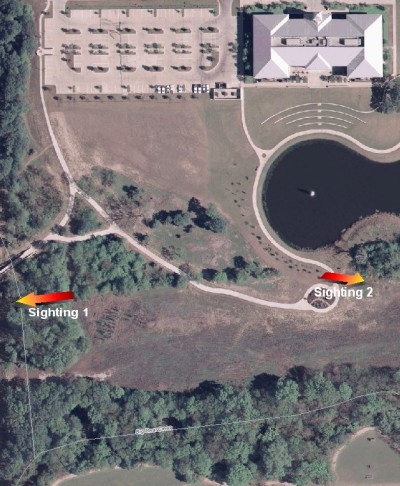
Unless you get out on the trails on a daily basis, you might not notice some of Keller’s wilder inhabitants.  For example, I’ve observed what I think is a bobcat in the vicinity of Town Hall at least twice now.  Once was about a month ago, right at dusk.  It was sitting in the brush right at the edge of the creek, looking towards the Pointe.  The second time was last evening, and it was sitting behind a rock at the edge of the brush, near the circle in the path behind Town Hall.

I’ve also seen a coyote on a couple of occasions in the vicinity of the intersection of Bear Ridge and Bear Run. 

And, of course, I would be remiss if I failed to mention my sightings of this friendly creature.  I’ve seen them near the creek where the bridge crosses over to the newer section (the one that takes you by the Pointe and over to Town Hall), in the creek, and in the little pond behind El Paseo (next to the Arthouse construction site). 

I probably should start carrying a camera with me so I can catch these creatures when I see them.

Follow The Bouncing Spam

It appears the botnet Joe Job has started again.  This time it’s “enlargement” products they’re hawking.

I’ve gotten 180 bounces since about 6:00pm yesterday.  At this rate I may be forced to disable my catch-all, but it’s going to be a major PITA.  I’ve probably got over a hundred aliases in use, and they aren’t individually registered.  This means that I’m going to have to grovel through all of my previously received and sent emails and pull out the addresses I used and create explicit forwarding entries for each one.

Update 1:  Got five more just in the two minutes it took me to write this entry.  angry

Update 1a:  Up to 226 as of 3:39pm.

Update 2:  All of the spams link to various nonsense domains that contain “information” about something called “Man XL.”  The scammer behind this nonsense is an entity calling itself “WW3 DISTRIBUTERS LLC.”  Should you receive such an email, beware clicking the link unless you want to see Prasad’s “business” (if you were unfortunate enough to have clicked, you’ll know what I mean by that).

Update 3:  Internally, all of these sites have a frameset that pulls the main frame content from http://www.cabaretmarin.net.  Hitting that address causes a redirect to http://barbarises.net/ms/?bb, which then redirects to http://barbarises.net/ms/index.php?k=<garbage>.  That appears to be a “campaign” tracking link (i.e. this particular batch of redirects through cabaretmarin.net seems to share this “k” value).

I did a random check of several of these “.info” domains that are in the emails.  The all have similar information (i.e. same name, address, email) and were registered just a few days ago via RegisterFly.  Here’s an example:

Registrant ID:tuJCnDTXYin4eSHs
Registrant Name:patrice pennetier
Registrant Organization:pennetier
Registrant Street1:rue notre dame, 21
Registrant Street2:
Registrant Street3:
Registrant City:tubize
Registrant State/Province:NA
Registrant Postal Code:1480
Registrant Country:BE
Registrant Phone:+1.3292313108
Registrant Phone Ext.:
Registrant FAX:+1.3292313108
Registrant FAX Ext.:
Registrant Email:pennetier@lagema.com

Information on “barbarises.net”:

Domain Name:barbarises.net

Registrant:
Mike Vester
      Allensteiner Strasse 24
      47237

Administrative Contact:
Mike Vester
      Mike Vester
      Allensteiner Strasse 24
      Duisburg 47237
      Germany
      tel: 49 7161 3079405
      fax: 49 7161 3079405
      mike.vester@jelled.net

Technical Contact:
Mike Vester
      Mike Vester
      Allensteiner Strasse 24
      Duisburg 47237
      Germany
      tel: 49 7161 3079405
      fax: 49 7161 3079405
      mike.vester@jelled.net

Billing Contact:
Mike Vester
      Mike Vester
      Allensteiner Strasse 24
      Duisburg 47237
      Germany
      tel: 49 7161 3079405
      fax: 49 7161 3079405
      mike.vester@jelled.net

Registration Date: 2006-07-14
    Update Date: 2006-08-31
  Expiration Date: 2007-07-14

  Primary DNS:  ns1.buckraming.com         220.179.67.133
  Secondary DNS:  ns2.buckraming.com         220.179.67.133

The cabaretmarin.net domain appears to have been registered via a privacy service, though, which is not surprising as this is the first real link in the chain to his spam site:

Registration Service Provided By: Registerfly.com
Contact: support@registerfly.com
Visit: http://www.registerfly.com

Domain name: cabaretmarin.net

Registrant Contact:
  RegisterFly.com – Ref# 19298483
  Whois Protection Service – ProtectFly.com (q0seacfx9h23tj@protectfly.com)
  +1.8458183604
  Fax: +1.8456984014
  P.O. Box 969
  Margaretville, NY 12455
  US

Administrative Contact:
  RegisterFly.com – Ref# 19298483
  Whois Protection Service – ProtectFly.com (fm1v2n5rhvt9jan@protectfly.com)
  +1.8458183604
  Fax: +1.8456984014
  P.O. Box 969
  Margaretville, NY 12455
  US

Technical Contact:
  RegisterFly.com – Ref# 19298483
  Whois Protection Service – ProtectFly.com (qy5r8qhg3urbbxu@protectfly.com)
  +1.8458183604
  Fax: +1.8456984014
  P.O. Box 969
  Margaretville, NY 12455
  US

Kitchen Selection Criteria

I was confronted by a bewildering array of models when searching for a coffee maker in the store today.  What finally pushed me to buy the one I brought home was that I found the user’s manual stuffed inside the display model.  I gave it a once-over to see what kind of cleaning ritual it would require.  This is a pet peeve of mine, in that so many things seem to require hand washing.  This one listed the carafe, lid, and brew basket as being top-rack dishwasher safe, which was what put it on top (despite a slew of units with more features and “cooler” form factors).  I don’t know whether the other units were dishwasher safe or not, as they don’t seem to list that feature anywhere on the packaging. 

This sort of thing has driven me to junk more than one kitchen appliance.  The best example of this would be the Mr. Coffee model TM50P Iced Tea Maker.  I was frustrated beyond belief by the cleanup involved with it.  The brew basket required hand washing and it was molded with a set of raised “fins” radiating from the center to the outside, leaving hundreds of little depressions that were impossible to get clean.  When I started looking for a replacement, I spent a lot of time researching units.  Unfortunately, I didn’t find any that were dishwasher safe, but I did find the Hamilton Beach 40911, which is much easier to clean (no obnoxious spider-web of fins to get tea gunk out of).  One of these days I’m going to take the Mr. Coffee to the range and give it the 12-ga therapy it so richly deserves…

Anyhow, I wish more manufacturers would be up-front and put it right on the box if the unit is dishwasher safe.  That’s a major selling point for me.

Update: As I mentioned in the comments, the new unit was having problems getting the water to siphon through the heater.  I thought I had it fixed, but after one pot it decided it didn’t want to flow anymore.  I finally ended up taking it back and getting a refund.  I did some research on this model on Amazon.com and came to the conclusion that I should have researched before going to the store.  The reviews were almost uniformly bad on this unit.