Slowly Driving Me Insane

In January I undertook a project to build a new server that used less power and made less noise.  I partially succeeded, but I ended up making things worse in a way.

The sharp-eyed observer might have noticed a Sound Pressure Level meter in the pictures in my last post.  Measurement at my right ear shows that my server produces about 60 dB.  In the grand scheme of things this is pretty quiet.  Still, though, compared to the system it replaced, I actually find it more annoying, despite being quieter (at least by subjective measurement, since I didn’t have the SPL meter when I retired the old server).  The difference is the pitch.  The new server has a higher pitch than the old, mainly because it appears that the majority of the sound is coming from the CPU fan (which is the AMD stock fan/heatsink included with their retail CPU package).  And lots of the CPU fan noise escapes because the case has an air duct and holes right above the CPU.

I’ve got a Thermaltake CPU fan/heatsink on order along with some larger, quieter case fans that I’m hoping will reduce the overall noise output, or at least change its pitch sufficiently so that it’s no longer so annoying.  The Thermaltake CPU fan is rated at 23 dB, so that by itself should make a difference.  According to UPS it’s “out for delivery” so maybe the madness will soon stop…

Update:  The box arrived a little while ago and I just took the CPU fan out of its blister pack.  The pictures don’t do it justice.  I knew it was going to be big, but this thing is freakin’ huge.  It also says 18 dbA on the box, so I’m not sure where I got the “23” rating that I mentioned above.  I suppose that could have come from another fan/sink I was looking at.  Anyhow, if I get a chance tonight I’m going to try to install it.  That should be interesting…

After action report:  Upon opening the case I was greeted by 7 months of dust.  I also had to ask myself if I really built this thing, since the cables were routed so badly. 
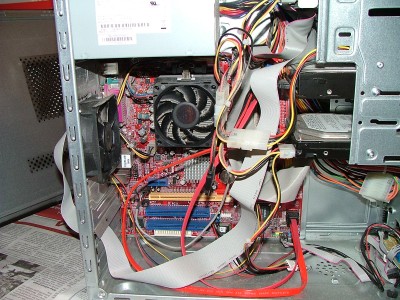
Fitting the new heatsink/fan turned out to be easier than I anticipated, despite the fact that it was quite a bit bigger than the old one.  Actually, getting the old one out turned out to be the hardest part of the operation.  In addition to a new heatsink/fan I replaced the case fan with a 92mm temperature controlled model (an Antec SmartCool).

I replaced the IDE cable for the DVD drive with a short, round one to reduce clutter and improve airflow, and I replaced the 18 and 24-inch SATA cables with 12-inch ones.  Finally, I tied and taped the parallel cable (it’s used for the HD44780 LCD panel) to get it out of the way.

The sound level, measured next to my ear while I’m in my chair, is now 51 dB (as compared to 60 dB previously).  Or at least that’s what my meter shows.  The lowest it can read is 50 dB, so we’re nearing the minimum it can read.  Running at full load (load average of 1.73) shows a CPU temperature of 41°C (which is 105°F for people like me who can’t get their heads around a temperature unless it’s in °F).  At idle it’s running at 30°C (86°F), which seems to be the same as with the stock AMD heatsink.
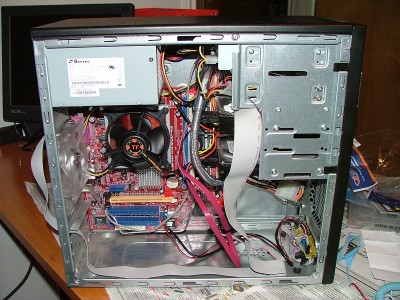
The sound pollution has definitely been decreased by changing the fans.  Time will tell if it’s enough, though. 

Heavily ‘ARM’ed In Mission Control

I’ve been a bit obsessed lately with trying to make my office into a more habitable environment.  I spend from eight to ten hours per day in here, so it seems to be in my best interest to eliminate any annoying or inefficient elements.

The first, and most annoying problem, was that the slide out keyboard tray that was built into the desk was too low.  I prefer to have my keyboard up higher, and it was also blocking me from getting close enough to the monitors (which are already pulled out to the very edge of the desk).  So I bought the Waterloo Sit Or Stand Capable Arm, Keyboard Tray & Mouse Tray Package to replace the existing tray.  Only after I got it did I realize that there were three cross-braces under the desktop that would be in the way.  I spent a considerable amount of time on my back under the desk cursing and getting sawdust in my eyes hacking those cross-braces out (I suppose they were there for heavy monitors or something, but I’m not putting a lot of load on the desk and removing them hasn’t caused a problem).  But once in place, the new tray has been much better to work with than the old fixed tray. 

The other issue is that while I have a primary PC I also have a laptop that I have to use from time to time.  It’s mainly for travel, but when I do need to use it I need to be able to do so while also using the primary.  I’d tried using the slide-out writing platforms on either side of the desk, but those quickly caused eye-strain, aggravated my latent carpal tunnel issues, or gave me a backache.  Almost by accident I stumbled upon the Ergotron LX Desk Mount Notebook Arm somewhere while I was looking for something else.  It was bit pricey, so I stewed on it for a while, but eventually found one for a bit less than retail and decided to give it a go.  Mounting was pretty simple (just one hole) and now I can have the laptop up where I can see it while using the PC.

Finally, I also have my server here in the office.  For a while I was using a KVM switch with my primary PC’s keyboard and one of its monitors to access the console of the server.  But that left me unable to use the primary PC while on the server’s console.  I came across a fairly inexpensive SpaceArm on eBay ($40 shipped vs the usual $200) and decided I couldn’t resist at that price.  It was a bit more of an involved installation, as I forgot to take into account the space used by the slide-out writing platform on the right side of the desk.  But a little ‘adjustment’ with a hacksaw took care of that problem (i.e. I notched the end of the platform to fit around the nut that holds the arm in from underneath). 

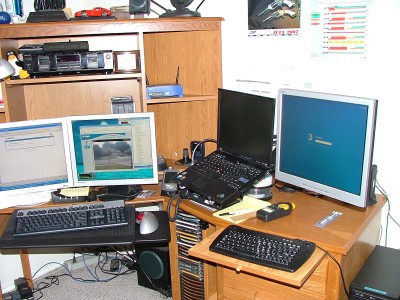
So now if I have everything in use it looks like the bridge of the Enterprise in here:

But when I’m just using the primary PC, I still have some desk space available on that side:

I also bought a small keyboard (SolidTek USB Mini Keyboard with Track Ball) for the server’s console that includes a trackball so I don’t have to have room for a separate mouse.  And that little vertical black box on the right edge of the desk is an LCD-monitor TV tuner device.  It lets me watch over-the-air TV on the LCD monitor.  I’m not in the habit of watching TV while working, but sometimes it’s useful to be able to tune into local TV if there’s a storm watch.  The audio is fed into a little manual switcher (seen underneath and between the dual monitors in the top picture).  The switcher sends audio either from my Squeezebox or from the server into an “aux” input on the main PC’s speakers (the main PC’s output is always active, so it can make for some interesting audio if you forget what you’ve got switched on).

Also, that huge UPS powers the server, the main PC, all the monitors, the phone, the VoIP TA, and the network switch (hidden behind the monitors), so that the whole thing stays up if the power takes a hit (although my internet connection will die within a few minutes it at least lets me tell you why I’m going offline).  The UPS’s USB cable is connected to the server which is running apcupsd.  The PC is running the Windows version of apcupsd in network mode to monitor the main server.  If the power fails, the PC will shut down based on being signaled by the server.

A Short Stack And Two iTunes Downloads…

I was listening to the radio this morning when they announced that IHOP was buying Applebee’s.  The only problem was that either the announcer didn’t enunciate or I didn’t hear the last part of the word and I thought they said Apple.

The idea of merging Apple and IHOP is kind of funny, though.  Can you imagine what the Apple stores would be like after the takeover?  And could you now get iTunes downloads with your Rooty Tooty Fresh ‘N Fruity?

Two Down… Many More To Go…

I was glad to see the announcement that two pump-and-dump penny stock scammers were arrested recently. 

Texas Attorney General Greg Abbott’s Special Investigations Unit charged two Texas residents with devising an illegal high-tech scheme to defraud investors out of more than $4.6 million. Both suspects, who were indicted July 3 by a Harris County grand jury, are the subjects of an ongoing investigation by several states and the Securities and Exchange Commission (SEC). In addition to the state’s charges, the suspects face securities fraud charges, which were filed today by the SEC.

Darrel Uselton, 40, of Katy, and his uncle, Jack Uselton, 69, of Houston, face organized criminal activity and money laundering charges. According to state and federal investigators, the Useltons reaped millions in illegal profits by promoting shares from at least 13 penny stock companies. The suspects then secretly sold those stocks into an artificially active market they created with manipulative trading schemes, spam e-mail campaigns, direct mailers, and Internet-based promotional activities.

I don’t know if these two were involved in any of the scams that affected me, but as the recipient of the blowback from bot-net blasted spam emails, I think it’s about time that some of these bastards were taken down.  It’s just unfortunate that we can’t bring back the stocks and the pillory.

Getting Out of AOHell

While I’m on the topic of brain-dead ISP’s, it appears that AOL’s cancellation tactics have finally gotten it into hot water.  They are now agreeing to mend their ways:

Under the agreement, which was filed by Texas and 48 other states, AOL must provide its customers a simple online cancellation method (http://cancel.aol.com). The attorneys general took legal action after AOL customers complained about difficulty and confusion when they attempted to cancel their AOL paid services. In the future, AOL must record and verify telephone calls between AOL customer service representatives and customers calling to cancel their accounts. AOL must also resolve outstanding customer complaints and provide refunds to consumers who complained since Jan. 2005 of unauthorized service charges or improper billing.

I suppose it remains to be seen if this actually pans out.  But then AOL is getting out of the ISP business anyway, so perhaps they anticipate lots of cancellations and would have done this anyway.

Spam Blowback Continues

Despite removing all catch-alls, thereby killing the Joe Jobbers in their tracks, I still seem to be banned from sending email to certain people.  Most notably people with AOL email addresses.

I had someone contact me yesterday via my Contact Form to ask some questions about the Marlin Camp Carbine, but my reply got bounced.  AOL informed me that it was not accepting email from my address.

Now this is stupid on the part of AOL, since I never sent spam to their users.  But they still put my domain into their blacklist of spammers, apparently because of the previous Joe Job crap. 

Anyhow… if you try to contact me and you’re using AOL (or Earthlink) and you don’t hear back from me, you might want to investigate getting a less brain-dead email provider.

Trust No One

I received an interesting letter from some company called Certegy yesterday informing me that information they were holding about my checking account was stolen and sold to direct marketers.  My first thought was, “Who the hell are you and why do you have my data?”  My second thought was unprintable…

Anyhow, it appears that Certegy performs check authorization for a lot of merchants.  But I don’t recall writing a check in a store in the past five years or more.  I have a debit card that is faster and easier to use for that purpose.  In fact, I only write two checks a month, and those are to a house cleaning service (which, as far as I know, doesn’t use any sort of authorization service).  So I’m really curious as to where and how Certegy got my data.  I suppose it’s possible they got it before I started using the debit card, since I’ve had the account since 1993 and used to write a lot of checks.

But if the data was that old, it really bugs me that they’re hanging on to it.  They really have no business need of data that old.  And it only adds to the problem when their systems get breached.  Which, it turns out, happened from the inside:

The employee was a senior level database administrator who was entrusted with defining and enforcing data access rights. To avoid detection, the technician removed the information from Certegy’s facility via physical processes; not electronic transmission.

So far, the data has only been used for marketing purposes.  Or at least that’s what Certegy claims.  Not that I exactly trust them, given that it’s in their best interest to minimize the fallout over this.  While they claim to have taken steps to notify the credit bureaus and are working on contacting financial institutions, the letter I got seemed to put the onus on me to watch for fraudulent activity on the account.  It also pointed me to various government websites with information about identity theft. 

If I end up having to get a new checking account because of this I’m going to be red-hot pissed off.  Between my direct deposits, the automated house payment, the debit card, and all the online bill-pay information that I have in the current system, moving to a new account is going to be a right pain in the ass.

I can’t help but notice that their Q&A dances around but doesn’t answer the question of what they’re doing to prevent this from happening again.  Perhaps if there were severe per-account monetary damages attached to data privacy breaches, they’d be a little more serious and proactive about not keeping unnecessary data and policing their employees.

Warning Ignored

Back at the end of May there was an interesting news story about a house in Cleburne that exploded when one of the residents lit a match to light a cigarette.  The reason it was interesting was that the house was all-electric and there was no gas service.

Now, a report in the Ft. Worth Star-Telegram explains how the gas got into the house.

How the gas got into the house

There had been a natural gas leak in front of the house for an undetermined amount of time, according to Wright’s report. Because the ground was so wet from recent rains, the gas was unable to escape through the usual cracks and openings in the soil and dissipate. Instead, it moved farther underground, along a path next to a new waterline and eventually into a sewer line leading into the house.

The sewer line was made of clay tile, which is “by nature full of gaps and imperfections that would allow the gas to enter the line,” according to the report.

A condensation line from an air-conditioning unit had been dropped into an open sewer pipe. Because the line was not sealed properly, the air-conditioning unit worked as a pump, drawing the natural gas from the sewer line and distributing it through air-conditioning ducts, Wright wrote.

Why no odor?

Natural gas is odorless. For safety reasons, Atmos Energy adds an odorant to its product. The odorant, mercaptan, gives gas a sulfurlike smell.

The gas inside the Pawliks’ house didn’t have an odor because “after traveling that far through soil and water the mercaptan … could be washed or scrubbed out by the filtering action of the soil,” according to the report.

When the story first came out I was pretty sympathetic to the residents, since it sounded like this was an out-of-the-blue occurrence.  However, this doesn’t appear to be the case:

A homeowner who was inside his Cleburne house when it exploded—resulting in his wife’s death—had been told not to light any more cigarettes just 45 minutes before the explosion occurred, according to a city fire marshal’s report.

David Pawlik called the Cleburne Fire Department’s nonemergency number between 3:30 and 4 p.m. May 29, telling fire inspector Scott Oesch that “every time my wife lights a cigarette, a blue flame shoots up to the ceiling,” according to a memo written by Oesch on May 31.

Oesch said he would check out the situation and told Pawlik not to light any more matches.

Pawlik’s wife, Hazel, wanted to smoke “a quick cigarette” before the inspector arrived. Pawlik lit a match, Fire Marshal Bill Wright reported. There was a blue flash, and the match went out. He lit another match, and there was an explosion of blue flames throughout the house at 632 Woodard Ave.

Between 15 and 20 seconds later, after the fire penetrated the ceiling into the attic, there was a more violent explosion, ripping a huge hole in the roof.

Hazel Pawlik, 64, died June 2 from her injuries. Four other family members were injured.

Hmm….  a “blue flame shooting up to the ceiling” sounds like what I’d call a clue.  Sure, they don’t have gas in the house, but you’d think that if you saw flames in the house you’d get the idea that there was some sort of flammable gas involved.  If it had been me, I’d have gotten out of the house immediately and called 911 from somewhere else.  I definitely wouldn’t light another cigarette.

New/Old Toy

Last week woot! was selling the Nokia 770 for $129, which was quite a deal considering that it had previously been selling in the $200-250 range.  But given the recent release of the Nokia 800, it was probably inevitable that the price would drop.  I’d been eyeing the 800 since its announcement, but wasn’t able to justify the $400 price.

I’ve been playing with the 770 for the past couple of days and I’m fairly happy with it.  It’s a little slow, and it isn’t a PDA replacement, but it works fairly well for simple browsing.  It also makes a great little interactive remote for my Slimserver/Squeezebox combination.

It also does basic audio/video streaming.  I was able to listen to a podcast, and although I haven’t had any luck with YouTube’s Flash player, I have been able to view some video files.

This entry was composed from my ‘comfy chair’ usng the 770.  Typing with the onscreen keyboard and stylus is a little slow, but manageable.

If I were going on a short trip and I just needed to check email and do basic browsing, the 770, combined with a phone that does Bluetooth DUN or a wireless hotspot would allow me to leave the laptop at home.

Update:  Added some screenshots.

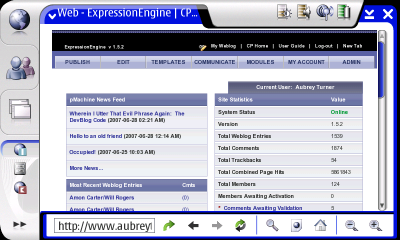
The browser (showing EE’s control panel):

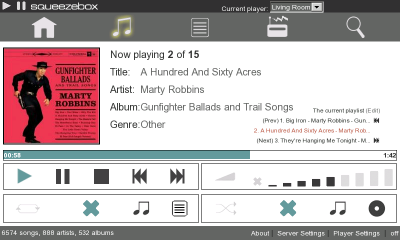
Controlling Slimserver (album thumbnail view):

Now playing view in Slimserver:

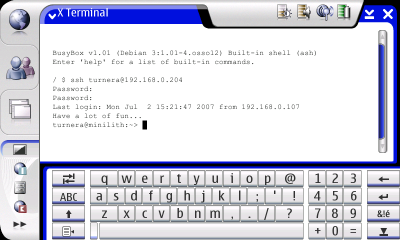
I installed Xterm and ssh: (yep, it’s running Linux under the GUI)

Up To My Eyeballs

This past week was a bit hectic and stressful.  Our project manager broke her ankle quite badly and has been out of commission for several weeks.  This has meant that I’ve been wearing both the architect and PM hats.  So I spent a lot of time spinning my wheels dealing with cost and schedule issues, to the detriment of everything else.

But at least I have this week off to recover.  Now if it would just stop raining for a day or two.  If it doesn’t, you can find me on the soccer fields at Bear Creek Park.  I’ll be the one building the ark…