Finding Computers Everywhere

For a long time one of the standard Slashdot jokes about any new hardware announcement was, “But will it run Linux?”  It seemed like people were trying to load Linux on everything, including a wristwatch.

Because of the structure of the code, it’s fairly easy to recompile for various hardware targets, and as new processors come along people will port Linux to the new platform.  This is either done because they have a pet project for that architecture, or in some cases by companies who want to use it in embedded products.  For just the costs of the port the company can have a full-fledged operating system that can scale from just a bare-bones kernel implementation all the way up to a full-fledged desktop (with X11R6 and KDE or Gnome). 

One of the first such projects to get widespread attention was probably the conversion of the Linksys WRT54G to run other firmware.  Due to the GPL, Linksys had to post their kernel modifications, so people had something to use to get started quickly with the hardware. 

One such example is the OpenWrt project, which provides a Linux distribution for the WRT54G (and its cousins, such as the Asus WL500G Deluxe).  It provides more AP/Router/Firewall features than the stock firmware, with the ability to choose additional packages and functions.  Of course there’s a limit to what you can do, since the system has limited RAM and flash.  Depending on the hardware revision, it has a 125MHz, 200MHz, or 216MHz processor with 16MB of RAM and 4MB of flash (unfortunately, v5.0 and later reduced the RAM and flash, which makes them much less flexible).

But it turns out that Linksys has another device, the Linksys NSLU2, which is a “bring your own drive” NAS (Network Attached Storage) device.  It has a 266MHz xScale processor (ARM), 8MB of flash, and 32MB of SDRAM.  The USB storage capability opens up more possibilities, since it’s now possible to store a much larger set of operating system files.  The flash memory can be used for the bootloader, which would then load the OS off of the USB storage device.  A fairly robust community for the NSLU2 (also known as “the SLUG”) has sprung up, with people using them for a variety of purposes such as a low-power/quiet media streamer or as a car computer.  Others have used USB hubs to add various devices, such as audio and webcams.

It seems that these development efforts are driven by the twin desires to have a cheap computer and to be able to tinker.  Their work has allowed for some fairly impressive accomplishments with some inexpensive hardware (the NSLU2 typically sells for about $80, and the WRT54G for about $50).

MP3 Geekery and Modem Lessons

I keep all of my music in MP3 files (when I get a CD I rip it and put the original CD away).  With the right playback software this makes it much easier to listen to my collection.  Otherwise I’d have to flip through about 500 CD’s to find anything.  It also lets me listen to the music on a variety of players, from my iPod to my Slim Devices Squeezeboxes.

I bought the original wireless version a little over three years ago.  Since then I’ve upgraded to the latest version (the v3), but the original one still lives in the bedroom for streaming net radio.  The thing about the Squeezebox is that it’s highly expandable.  The Squeezebox itself is just some decoder hardware with a CPU, networking hardware, and a display.  The main logic is handled in the server.  Slimserver is written in Perl, has multiple API’s for expanding its function, and is open-source so you can modify it as much as you like.  In fact, you can use it even if you don’t have a Squeezebox.  It does basic MP3 streaming to any player that can connect to it (such as WinAmp, iTunes, or Windows Media Player).  If you set up your home firewall right, you can access your Slimserver from anywhere you have Internet access and stream your music to that location (I’ve done this on business trips, using WinAmp on my laptop through the hotel’s Internet connection).

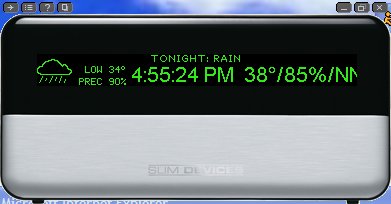
Anyhow, by adding plugins to Slimserver, you can stream other information on the Squeezebox while it’s idle, such as stock quotes, sports scores, or weather.  I do this for the one in the living room, which is constantly streaming current weather conditions and the forecast for the next day using the SuperDateTime plugin:

Another neat feature is that they also provide a Java-based software version of the Squeezebox, called SoftSqueeze, which you can use as an emulator.  I used SoftSqueeze for the above screenshot.

Early this week I was fiddling around on the site and came across instructions from someone who used Linux and a modem to get Caller ID on his Squeezebox display.  Since I had a couple of old modems laying around and a Linux system running for my scanner stream, I figured this should be pretty easy to get going.  Since the COM ports were already being used by the UPS and the scanner, I plugged in a USB-Serial adapter.  I was amazed and how easy it was, as SuSE 10.1 auto-detected the device as /dev/ttyUSB0 and I was quickly communicating with the modem using minicom.  This is where I ran into a lesson on modem chipsets and how they’re implemented in various modems. 

There is a fairly standard AT command for enabling Caller ID, and almost all chipsets support it.  Unfortunately, they also require some special circuitry on the modem’s board.  Without that circuitry the chipset can’t read the CID information without taking the line off hook.  So even if you query the chipset for CID support, it effectively lies to you by saying that it’s available, even if it isn’t.  Since neither of my old modems would work, that put a bit of a snag in my plans for quick and free CID display.  After some confusing research into which modems really support Caller ID, I found a model on eBay for $15 including shipping.

Once I had the new modem, I decided I didn’t like the idea of having a mgetty running on the line, and since I don’t need to use it for calling out, I decided it’d be easier to just use a dedicated program to monitor the modem.  I found a script online that someone wrote using Perl and modified it slightly to format the Caller ID info and invoke the script that was used in the mgetty example.

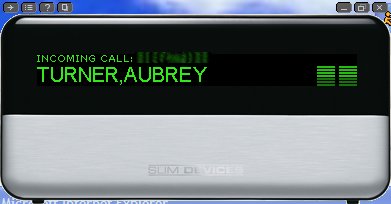
So now my Squeezebox players display the Caller ID when someone calls and they automatically lower the volume:

My next project will be to add the IRBlaster that lets the Squeezebox control my receiver.  This will allow me to set up the Squeezebox (through an IR plugin in the Slimserver) so that when I turn it on it automatically turns on the receiver and changes to the correct input (and turns the receiver off when I turn off the Squeezebox).

Connecting Remotely

A recent Slashdot post referenced this article from Network World about telecommuting and career advancement.

Over 60% of 1,320 global executives surveyed by executive search firm Korn/Ferry International said they believe that telecommuters are less likely to advance in their careers in comparison to employees working in traditional office settings. Company executives want face time with their employees, the study said.

I suspect this is true to some extent, but it probably depends more on an organization’s culture than anything else.  Some organizations deal better with it than others.  When I moved to my current division it quickly became obvious that they weren’t used to dealing with remote workers.  The majority of the people in my new area were co-located.  So there was a definite bias to walk down the hall or go over to the next building to deal with a local coworker before calling someone who was remote, even if the remote person was responsible for the thing in question.  I also frequently saw meeting notices that listed a conference room but without a call-in number. 

What helped was some initial face time via a visit to the site to establish people and roles (i.e. a series of “all hands” meetings in the area).  Once they established you as the person responsible for something they tended to be more likely to reach out and contact you.  But it’s a two way street, in that you, as a remote worker, also have to keep your “eyes” open and maintain contact with people, so as to reinforce your place in the organization.

Management also recognized the cultural clash and took steps to make changes, such as organizing “best practices” sessions on remote work and having some managers work from home from time to time to get a feel for it.

Granted, working remotely is somewhat less efficient than being able to walk down the hall and have a whiteboard discussion over some design point or technical issue.  But I don’t see it going away anytime soon, especially for people in technical professions that don’t absolutely require a physical presence.  Companies are putting together more and more teams that are geographically dispersed, because the people with the skills are likely to be in different locations.  This is especially true if the work is project-based.  Teams form and reform over time as different projects come through.  It simply isn’t cost-effective to move people to one location for a single project.

As for career advancement, I don’t think it’s a problem, at least since the organization I’m in is working to make sure to include remote workers.  I guess we’ll see.

Shoulder To The Wheel

I’m not dead.  I’ve just been up to my ass in alligators.  It seems as if everyone finally woke up on the job and I seem to be on everyone’s critical path (at least to hear them tell it).  Anyhow, I think I’ve finally got a handle on things.

More to come…

Passing On Costs

Back when my office was moved to a more distant (and frustrating) location, someone intimated to me that the move was done on purpose to shake out more people and make them work from home.  It saves the company significant amounts of money in freeing up office space, since they were leasing and paying by the square foot. 

While they give you reimbursement for internet and phone costs, it turns out that there are some other costs that you don’t really think about until later.  While I’ve decreased my gas costs and wear-and-tear on the Avalanche significantly, my electric bill has been murderous this past year. 

What got me to thinking about this was a recent article I saw somewhere (can’t remember where, though) about how people could better conserve electricity if they had access to up-to-the-minute rate information and if rates were varied based on time of day.  Some industries already do this and they get a break on the rates if they move their consumption to off-peak hours.

If I were not working from home, I might be able to take advantage of this sort of arrangement.  Most programmable thermostats come programmed to do this automatically (the default program increases the temperature during the day (in cooling mode) and decreases it in the evening).  I have one of these (and it works great in the winter), but I had to override the default programming since I’m here all day, every day.  And given our Texas summers, it’s just impractical to move much consumption to off-peak hours, since our peaks are driven by the heat.  Even if you turn your thermostat way up during the day and have a well insulated house, the air conditioning will still have to run during the hottest part of the day just to keep up with solar heating.  At most you’re going to shave a few percentage points off your usage during the morning hours. 

I guess it’s more useful for other parts of the country where air conditioning isn’t pretty much mandatory.  For me the reduced driving costs had offset the increased electric costs up until this past year.  But that’s mainly due to the way Texas handles electric rates (i.e. TXU was able to set its costs during Katrina when natural gas was through the roof and has continued charging those rates even though gas has come down).

However, another thought occurs to me:  If more and more people are beginning to work from home (driven by corporate cost-cutting and high fuel prices), we may end up increasing overall electric demand, as more and more homes have higher peak-time usage because those homes are used for offices.  In general, I’d think that an office building would be a more efficient user, as cooling is consolidated in one building that houses multiple offices, rather than having to cool the equivalent number of homes (i.e. trying to cool one big box as opposed to thousands of little boxes).

I guess all this is moot to me now anyway, since I have a dog that is unsuitable to hot weather.  Even if I worked in an office again I’d leave the air on for her while I was away.

iSue

It looks like Apple didn’t get all its legal ducks in a row before announcing the iPhone.  Cisco, the holder of the trademark for iPhone (it’s held by a company Cisco acquired, which registered it in 1996), has decided to sue them over it.

Cisco Systems has filed a lawsuit against Apple accusing the company of infringing its iPhone trademark, the networking company said Wednesday.

The suit also accuses the iPod maker of using a front company to try to acquire rights to the name.

Cisco accused Apple in a suit filed in United States District Court for the Northern District of California of willingly infringing its trademark when it announced the new iPhone at the Macworld Expo in San Francisco on Tuesday.

Cisco said in the complaint that Apple had attempted to get rights to the iPhone name several times, but after Cisco refused, the company created a front company to try to acquire the rights another way, according to the lawsuit (click for PDF).

Mark Chandler, senior vice president and general counsel at Cisco, said in an interview that the companies were close to finalizing a deal Monday night that would have allowed both Cisco and Apple to use the iPhone name. One aspect of the agreement called for some sort of technical interoperability between Cisco’s Linksys Internet telephony products and Apple’s cell phone. Chandler said the hope was that by making the products interoperable, it would help alleviate confusion among customers, who would likely be target consumers for both products.

The companies left the negotiating table at 8 p.m. Monday with only a few points left to negotiate, Chandler said. Then on Tuesday, Apple CEO Steve Jobs took the stage at the Macworld Expo and, amid much fanfare, unveiled the new “iPhone.”

“We indicated that it was important that the negotiations be completed before the launch of their product,” Chandler said. “Our expectation was that our name wouldn’t be used without permission. And it is a surprise when any large company announces a product using a name they don’t have a right to use.”

I can’t help but wonder just what Apple was thinking by going forward with the announcement.  Perhaps they think that they own iEverything?  Or maybe it’s just iArrogance?  Cisco, being twice as large as Apple, has plenty of money for lawyers, so Jobs may end up having his iCrank fed into the iGrinder if he’s not careful.

iDunno

Apple finally put an end to all the annoying speculation today by announcing the iPhone.

As I followed along with Engadget’s coverage I was increasingly interested.  This might finally be the device I’ve been looking for:

  • It integrates an organizer, phone, camera, internet communications, and iPod all into one device.
  • It works with POP3 and IMAP (includes free Yahoo Push IMAP account).
  • It has a new touch interface to avoid having to deal with all those annoying little buttons
  • It uses OSX for full-featured applications.
  • It uses a real web browser and has the resolution needed to get away with it.
  • It works well with Google maps (Jobs demonstrated calling a business directly from the Google map results).
  • It handles movies (i.e. the “video iPod”) and pictures.

Nice form factor, good bright and colorful interface:

What’s that in the upper left corner?

Nevermind, they’re talking about more nice features.  Five hour talk time.  Sixteen hours of audio playback.  Wi-Fi and Bluetooth 2.0.  It’s a quad-band GSM and EDGE phone.

Uh oh, they said EDGE.  My enthusiasm began to fade a bit.

Sure enough, reading on I found that Apple and Cingular have made an agreement.  You can only get the iPhone with Cingular.

Oh well…  I guess I can keep waiting for the perfect converged portable device.

Somebody wake me when an iPhone is available on a real network (fewest dropped calls, my ass).

Thoughts On Dreamhost Service

Dreamhost has taken a lot of hits recently due to instability and downtime.  I think some of the complaints were overblown.  After all, if you’re betting your business on a website, a $9.99/month shared hosting plan isn’t very smart.

However, Dreamhost has slipped in several areas since I first joined them in 2000.  Given my recent experiences with them and their support staff, here are a few recommendations I have on ways Dreamhost could improve.

1.  Bring back targeted email/panel announcements.

This was one of the better things they used to do.  Whenever a server you were using was going to have any work done they’d send you an announcement telling you what servers were affected, what was being done, when the server would be down, and for how long.  They’ve since moved all of their announcements to their status page, which is a crappy way of doing things.

I don’t expect Dreamhost never to have any downtime, especially at the rates we’re paying.  But they could certainly do a better job of communicating with users.  As an example, they moved my server in early December and the only way I found out about it was after the fact when I saw their status entry.  I should not have to keep track of their blog to determine when one of my systems is being affected.  I should get a directly targeted email.  It cuts down on the clutter I have to manage.  Yes, I know they have RSS feeds, but that still means I have to poll the stupid thing to get information and that I have to wade through all the announcements that are meaningless to me to determine if something is relevant.

This would have also helped me with the ImageMagick issue that I discovered after the upgrade (i.e. I would have known the exact date of the change).


2.  Inform users when their particular systems are down or are rebooted

This is somewhat related to the first item, but that was proactive, while this is reactive.

It’s understood that sometimes things break and a system goes down or has to be rebooted (even if all of your stuff is still working).  As soon as any trouble ticket for a particular system is seen and the problem is verified (not fixed, just verified), then all users of that system should be notified that a problem has been identified and is being worked.  When the problem is fixed, another announcement should be made.  Being properly informed would likely prevent additional trouble tickets from other users of the system if they know the problem is being worked.

I think this would go a long way towards getting ahead of the customer satisfaction issues.  Something like 90% of the griping (my unscientific impression of it, anyway) in the comments is from people who are complaining that their sites are down, yet they aren’t affected by the system that was mentioned on the status page.  But since they don’t trust the ticket system and don’t have any positive information about the problem they flood the comments with complaints about their own sites.  If the system was known to work properly and people knew they’d be notified, there’d be a lot less griping. 


3.  Allow users to update their own trouble tickets

If there’s a way to do this, I haven’t found it.  But in several instances now I’ve need to update the ticket with new information (i.e. in one case I found the problem myself and just needed them to do something; in another the problem went away “on its own”).  My only recourse was to either open a new ticket and reference the first or wait for the tech to reply. 

The last case, where the problem went away on its own, appeared to me to have been a problem with the database server.  And from what I could see, someone rebooted it.  Everything was working fine within 30 minutes of me opening the ticket.  First, if I’d been properly informed (per my suggestions #1 and #2 above), I’d have understood what was going on (and obviously someone was working on it, since the DB system was rebooted), and would not have opened a ticket.  Or, if I hadn’t seen the announcement in time, I could have closed the ticket myself, thereby saving everyone time.  Instead I had to wait 14 hours for a Dreamhost tech to get around to telling me that the site was working fine now.  Duh! 


4.  Provide a site monitoring service

When I first started with them they used to have a system status page where you could see the uptime information for your Apache, MySQL, and SMTP/POP3 services.  Of course, checking uptime in Apache isn’t necessarily an accurate reflection of a site’s availability, since there are other factors, such as application load, network and database availability, etc that can allow Apache to stay up even if the site doesn’t “work.”  Since the status page didn’t give accurate uptime impressions, they decommissioned it.

It’d be nice if they had a site/application monitoring service that allowed you to specify your own webpage and the frequency of monitoring.  That way it could monitor a real example of your application (i.e. the page you specify would access the database and run the application code) and not just the HTTPD status.  The service would then notify you if the site didn’t respond or gave an error. 

Since this involves additional resources to handle, I could see this being a fee-based add-on.  Perhaps it could even include a feature to open a problem ticket automatically if certain events are triggered (this would likely require an extra fee, as well as some work on your part to identify the various failure modes). 

Anyhow, this is just a “nice to have” thing, not necessarily something that’d be required.


At the root of all of these is a simple idea:  Keep your customers informed.  If people have relevant, timely, and accurate information about their systems, there should be a lot less griping (or at least less confusion).

Upgrade Breakage

Last summer I implemented watermarking for all hotlinked images.  But while checking referrer logs today I came across some images that weren’t getting watermarked.  This puzzled me at first, as all the logs clearly showed that the file was being properly redirected and they were picking up the watermarked version.  Examining the cache showed that everything since late December wasn’t getting the watermark added (the cache image was the same as the original).

Looking at the watermarking script and the fact that it used the composite command from ImageMagick reminded me that Dreamhost had just upgraded ImageMagick.  They’d long been running on a very downlevel version and upgraded at the end of December to v6.2.4 (which is still a bit odd, given that the current release is 6.3.1).  Thinking that perhaps something in the command line had changed from v5 to v6, I tried manually running the command.  Even with debugging and verbose options on, it showed no errors and the invocation matched the example in the documentation.  It just wasn’t adding the image overlay.

So I took a further look at the documentation and they had an example of using commands to dynamically generate the text (with associated background changes to help differentiate it).  I created a small script that used parameters for the filename and replaced the composite command in the watermarking script with my script.

#!/bin/bash
convert -size 250×35 xc:none -gravity center \
    -stroke black -strokewidth 2 -annotate 0 ‘Hotlinked from aubreyturner.org!’ \
    -channel RGBA -blur 0x3 \
    -stroke none -fill white   -annotate 0 ‘Hotlinked from aubreyturner.org!’ \
    +size $1 +swap \
    -gravity south -geometry +0-2 -composite $2

I still don’t know what broke in composite with the upgrade, but at least this works and looks better than my original.

Hotlinkers will get the image with the text added at the bottom in the center, like this:
Flight deck image

Coffee IV, Stat!

I went back home to visit my mother for New Year’s, since she had that time off (after working over Christmas). We had our Christmas and New Year’s celebration rolled into one. And with the recent rains we were able to do our own fireworks, which we hadn’t been able to do in quite some time.

The only downside to all this is that my mother lives on a different schedule. She usually doesn’t come home from work until 11:30pm, and doesn’t go to bed until 12:30 or 1:00am. Since I’m usually in bed by 10:30pm and I’m up at 6:00am, it’s a killer switching back from her schedule to my own.

I’m going to be seriously draggin’ for a while until I readjust.